Complex Discounts.
Zero Code. Total Control.
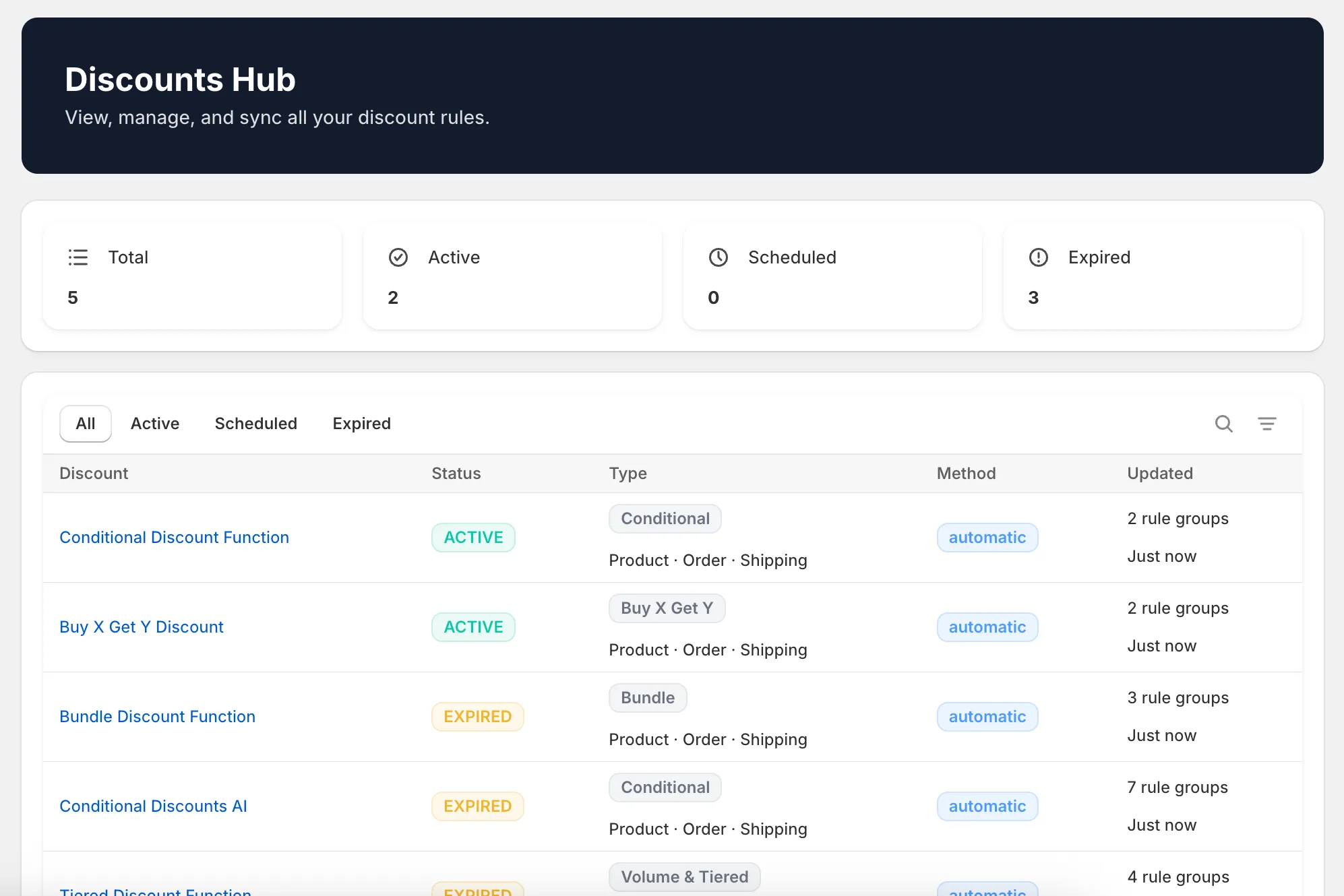
Build powerful discount rules that Shopify can't do natively. Conditional logic, tiered pricing, BXGY, and bundle discounts — all through a visual rule builder.
Platform
Built for the way Shopify discounts should work
A visual interface for complex discount logic — no developers required.
No-Code Rule Builder
Build complex discount logic visually with an intuitive drag-and-drop interface. No developers required.
16 Condition Types
Customer tags, cart subtotal, product collections, quantities, AND/OR logic — combine any conditions you need.
3 Discount Classes
Apply discounts at product, order, or shipping level. Full control over where and how discounts are calculated.
Native Shopify Integration
Runs as Shopify Functions with full admin integration. Your discounts live inside Shopify, not bolted on.
0
Condition Types
0
Discount Functions
0
Customization Types
0+
Max Rule Groups
Discount Types
Four discount types. Unlimited possibilities.
From simple conditional rules to complex bundle pricing — choose the logic that fits your business.
Conditional Discount
If X, apply Y
Set conditions based on customer tags, cart contents, or order properties — then apply the right discount automatically.
IF customer.tag = "VIP" AND cart.subtotal > $100 THEN apply 15% off
Tiered Discount
The more you buy, the more you save
Create quantity or spend-based tiers that reward larger orders. Perfect for wholesale and volume pricing.
Buy 5+ = 10% off, Buy 10+ = 15% off, Buy 25+ = 25% off
Buy X Get Y
Buy 2 get 1 free — and beyond
Configure flexible BXGY promotions with custom triggers, target products, and discount amounts.
Buy 2 from "Summer Collection" GET 1 "Accessory" free
Bundle Discount
Buy together, save together
Define product bundles with automatic discounts when customers purchase the complete set.
Buy "Shirt" + "Pants" + "Belt" together = 20% off bundle
Visual Rule Builder
See your discount logic at a glance
Build, test, and deploy discount rules with an intuitive visual interface. No more guessing what your Scripts actually do.
- 16 condition types to combine
- AND/OR logic with nested groups
- Real-time validation and previews
Enterprise Ready
Migrate from Scripts with AI guidance
Our AI Assistant's Expert mode helps you recreate your existing discount logic as rules — just describe what your Script did and it'll guide you through the setup. Full version history keeps your team confident.
- AI Assistant with Expert mode
- Version history with rollback
- Rejection rules to prevent abuse
Checkout Customization
Control the entire checkout experience
Hide, rename, or reorder payment and delivery options based on customer, cart, or product conditions — without writing checkout extensions.
- Payment method customization
- Delivery option rules
- Condition-based checkout logic
Checkout Upsells
Lift AOV with one-click upsells at checkout
Show targeted product offers at every step of Shopify checkout — Information, Shipping, Payment, and Summary. Conditional rules, variant pickers, and one-tap "Add" without breaking flow.
- Step targeting: Info, Shipping, Payment, Summary
- Up to 30 active upsell rules per store
- Variant pickers for multi-option products
Get Started
Up and running in three steps
Install from Shopify
One-click install from the Shopify App Store. Connect to your store in seconds.
Build your rules
Use the visual rule builder to set conditions and actions — no code, no guesswork.
Discounts go live
Publish instantly. Your rules run natively as Shopify Functions — fast and reliable.
FAQ
Questions? Answers.
Is there a free trial?
Yes — starter plan includes a 3-day free trial. No credit card required to start. You get full access to all features in your chosen plan during the trial.
What happens to my Shopify Scripts?
Shopify is deprecating Scripts in favor of Shopify Functions. Our app runs natively on Shopify Functions, so you're future-proof. Our AI Assistant's Expert mode can help you recreate your existing discount logic as rules — just describe what your Script did and it'll guide you through building the equivalent setup.
Does this work with Shopify Functions?
Yes — Alfo - Discount Functions is built entirely on Shopify Functions. Your discount rules run natively inside Shopify's infrastructure, which means fast performance and full compatibility with Shopify's checkout.
What's a rule group?
A rule group is a set of conditions and actions that define one discount behavior. For example, "If customer has VIP tag AND cart is over $100, apply 15% off" is one rule group. Your plan determines how many active rule groups you can run simultaneously.
How does AI Explain work?
AI Explain is free on all plans, including Starter. It lets you ask plain-language questions about any rule in your setup and get a clear explanation of what it does and why. Starter plans get 10 explanations per 2 hours; Pro and Enterprise get 30 per hour. The AI Assistant also includes Generate, Update, Refine, and Expert modes — these use credits and are available on Enterprise.
What is Rule Scheduling?
Rule Scheduling lets you set date-based activation windows on rule groups — so your discounts go live and expire automatically. Perfect for seasonal sales, flash promotions, and campaign launches. Available on Pro and Enterprise plans.
Can I use both automatic and code-based discounts?
Yes. You can create discounts that apply automatically at checkout or generate unique discount codes that customers enter manually. Both types support all condition types and discount logic.
Can I upgrade or downgrade anytime?
Absolutely. Plan changes take effect immediately and billing is prorated. Your existing rules remain active — if you downgrade, rules beyond your new plan's limit are paused (not deleted) until you upgrade again.
What are checkout upsells and how do they increase AOV?
Checkout upsells are targeted product offers shown during Shopify checkout — at the Information, Shipping, Payment, or Summary step. Customers add the offer in one tap without leaving the flow, which lifts average order value (AOV) without extra ad spend or post-purchase friction.
Where in checkout can I show upsells?
You choose where each upsell rule appears: Information step, Shipping step, Payment step, Summary step, or every step (default). Different products can target different steps — for example, accessories on Information, shipping protection on Shipping, warranties on Payment.
Can I target upsells based on cart contents or customer?
Yes. The same condition engine that powers our discount and checkout customization rules also drives upsells — match by product, collection, cart subtotal, customer tag, or country. Show the right offer to the right buyer at the right moment.